Services
Remote Analysis Desktops
Desktop-as-a-Service (DaaS) infrastructures provide you Virtual Desktop solutions via flexible remote access from locations and devices of your choice. DaaS setups enable researchers easy, efficient and flexible usage of software and hardware components that best suit their (bioimage) project needs. NFDI4BIOIMAGE supports the development and provision of the Bioimage ANalysis Desktop (BAND/BARD) and the Open Source Virtual Desktop Infrastructure (OSVDI) as two DaaS services. Explore and employ them.
Bioimage ANalysis Desktops (BAND/BARD)
Bioimage ANalysis Desktop (BAND) and Bioimage Analysis Research Desktop (BARD) are platforms that offer cloud-based desktops accessible with a web browser. So you can comfortably analyze your bioimage data with high computing power from anywhere with an internet connection.
Who are BAND and BARD recommended for?
- Life scientists
- Bioimage analysts
- Course organisers/trainers
Which expertise do you need?
Which infrastructure do you need?
- For BAND and BARD users: A workstation or laptop with internet connection
- For BAND deployment (e.g. system administrators, software developers): OpenStack or virtual machines
- For BARD deployment: Kubernetes clusters
What are BAND and BARD and how can you benefit from them?
BAND is a cloud-based, flexible computing environment designed to make bioimage analysis easier and more accessible for users. It offers you essential tools and computing power in a single, integrated workspace. You work within a familiar graphical desktop that opens in a web browser. You will not need physical hardware, elaborate local installations or complex environment setup.
BAND is particularly suitable for your bioimage analysis workflows that require access to cluster computing. It is ideal for researchers who need both interactive exploration and large-scale batch analysis.
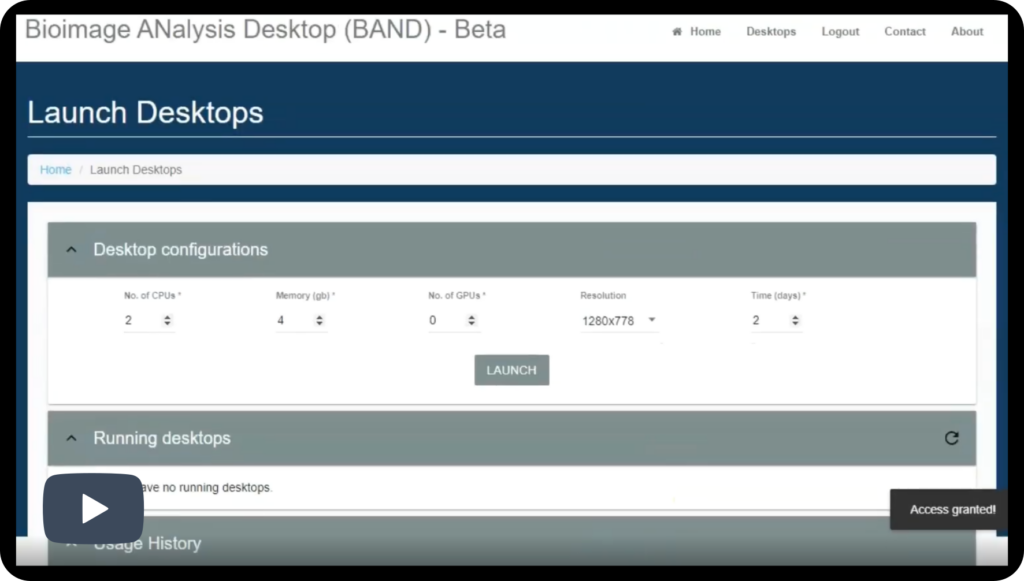
Users can launch desktops with resources tailored to their specific tasks, such as the required number of CPUs, memory, or GPU acceleration.
From a technical perspective, BAND is built on OpenStack, open source cloud computing infrastructure, and uses containerized software to provide a consistent and reproducible computing environment. Each user desktop runs as a cluster job with resources allocated on demand. Access to BAND is provided through federated login mechanisms, such as Google, LSAAI, EGI-Check which allow users to sign in securely using existing credentials.

How to get started with BARD
- Request an account for access to the EMBL BAND instance by sending an email to cbbcssupport@embl.de.
- Once you have your account, open a browser and access the website of the instance.
- Select a ‘flavour’ for your desktop by clicking the option buttons under “Resources”.
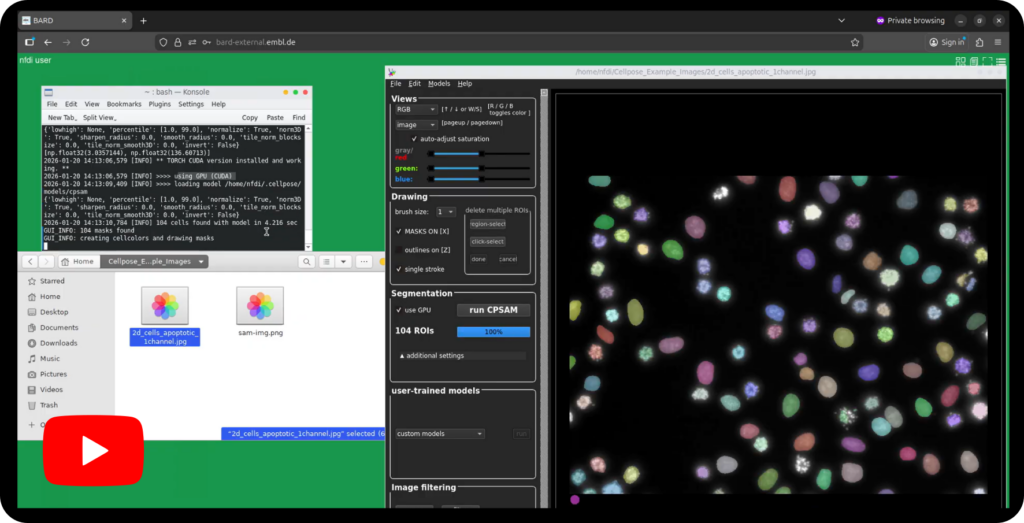
- Click ‘Connect with Guest Account’ and enter your login details. Once loaded, you will see a desktop interface, your new workspace. The application dock is located at the bottom of the screen.
- Start your application of choice by clicking its icon in the bottom dock (for example Cellpose-SAM as in our video tutorial example). Off you are for your analysis. Additional applications can be accessed from the menu in the top-right corner.
How to get started with BAND
- Open a browser and go to one of the following
- Agree to the “Terms of Use” and “Privacy Notice”
- Click the LOGIN button, then a popup window will appear. (make sure you allow browser pop-ups)
- Choose an Login option (e.g.Google)
- Go through the login process for the selected option. (Note: BAND does not store user credentials)
- After completing the login process, wait for an confirmation email from “CBBCS Support”, e.g. If you login via Google, check your Gmail for the email. (If you don’t receive the confirmation email within 5 mins, contact cbbcssupport@embl.de)
- Once you receive your confirmation email, go back to the BAND home page and log in again.
- You will be automatically redirected to the “Launch desktop” page after successful login.
- Choose your desired configurations (CPUs, Memory, GPUs, Screen resolution, and desktop running time).
- Click “Launch Desktop”. Your desktop will be available in the ”Running Desktop” section if the launch is successful.
- Click “Go to desktop” to view your desktop in a new browser.
- If this is your first time using the BAND, you may see a red error message appear after clicking “Go to Desktop”. If you see it, please simply stop the desktop and re-launch.

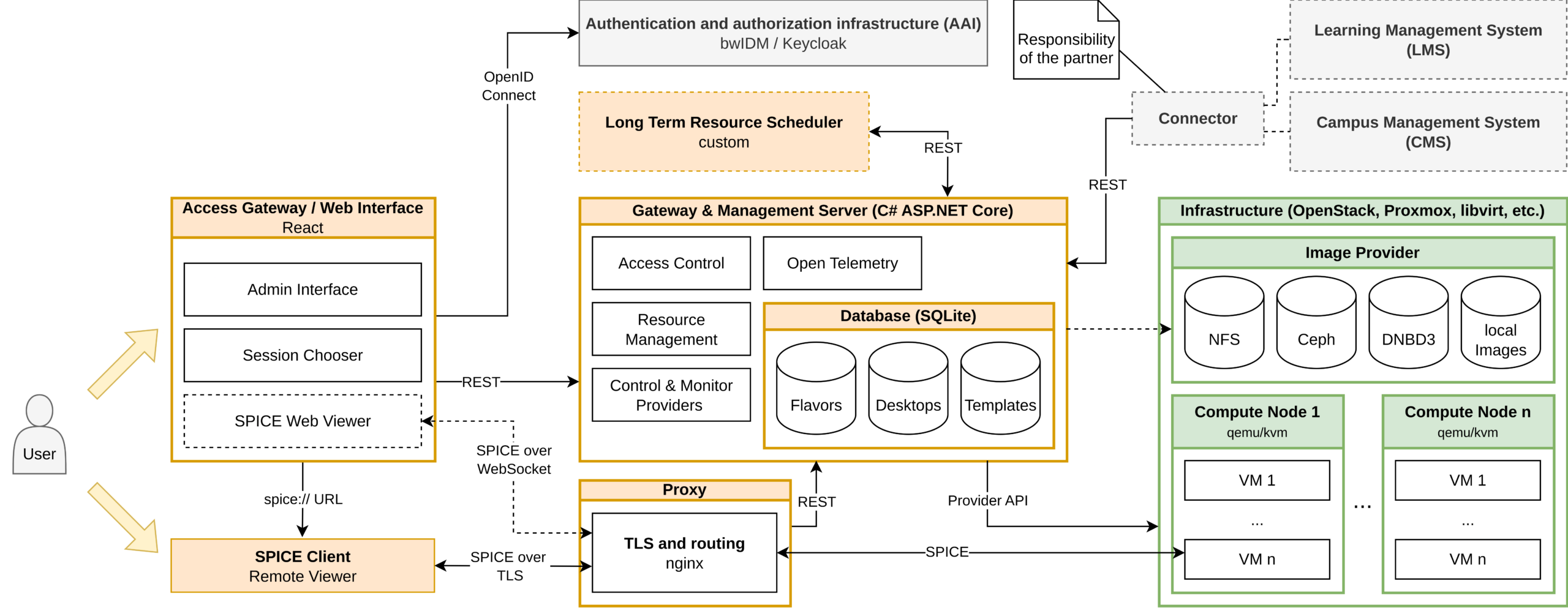
Open Source Virtual Desktop Infrastructure (OSVDI)
The Open Source Virtual Desktop Infrastructure (OSVDI) we develop addresses the hardware accelerated full virtualization of traditional graphics workstations deployed in all aspects of interactive imaging. Test our demo hosted at the Computation Center of Universität Freiburg.
Who is OSVDI recommended for?
- IT infrastructure operators
- Operators of imaging facilities and labs
- Course organisers/ trainers and life scientists as users
Which expertise do you need?
- Users: A workstation or laptop with internet connection in a local of your choice
- IT/ facility or labs operators: resources for hardware and virtualization (not much different from ‘standard’ hardware in conventional setups)
Which infrastructure do you need?
- For OSVDI usage: no training required
- For image analysis via OSVDI: knowledge in bioimage analysis and the used applications
How to get started with OSVDI
- We will soon provide details to access the Freiburg demo instance of OSVDI. Stay tuned.
What is OSVDI and how can you benefit from it?
Virtual Desktop Infrastructure (VDI) solutions provide complete remote desktop representation in virtualization or cloud to be accessed over a network connection. OSVDI provides a full stack virtualization of (powerful) imaging workstations running a wide range of desktop operating systems and applications.
VDIs provide infrastructure and tools that provide researchers remote access to centralized hard- and software setups via virtual desktops with similar user experience to the local workstation and the known software environment. The desktop environment is identical to the traditional workstation. Even very high resolution displays are possible in case of appropriate network connection. VDI usage requires much lower network bandwidth for transfer of large datasets, ranging from10 Mbit/s in standard full-HD to less than 100 Mbit/s for significantly higher resolution and fast changes.
All VDI/DaaS solutions avoid the necessity for you as a user to actually come to the office to work on specialized hardware but rather handle and analyse data through remote access. Compared to traditional desktop computer environments, such centralized, virtualised and scalable cloud-like infrastructures are charactised by:
- Less administrative work
- Remote and faster data access
- Better access control
- Higher security
- More efficient and flexible hardware and software utilization
- Lower environmental footprint due to more efficient resource usage
OSVDI is co-funded by NFDI4BIOIMAGE and the bwCloud3 service development project.